













A customer sees two charges for one order and writes to support. The agent can confirm the duplicate payment and explain the refund policy. That is only the first step. The payment record still needs checking, the account may need a closer look, finance has to process the request, and the customer needs to hear back once it is done.
Most companies use different systems for each part of that work. The problems often appear in between. One tool holds the payment details, another holds the support case, and staff are left copying information or following up by hand.
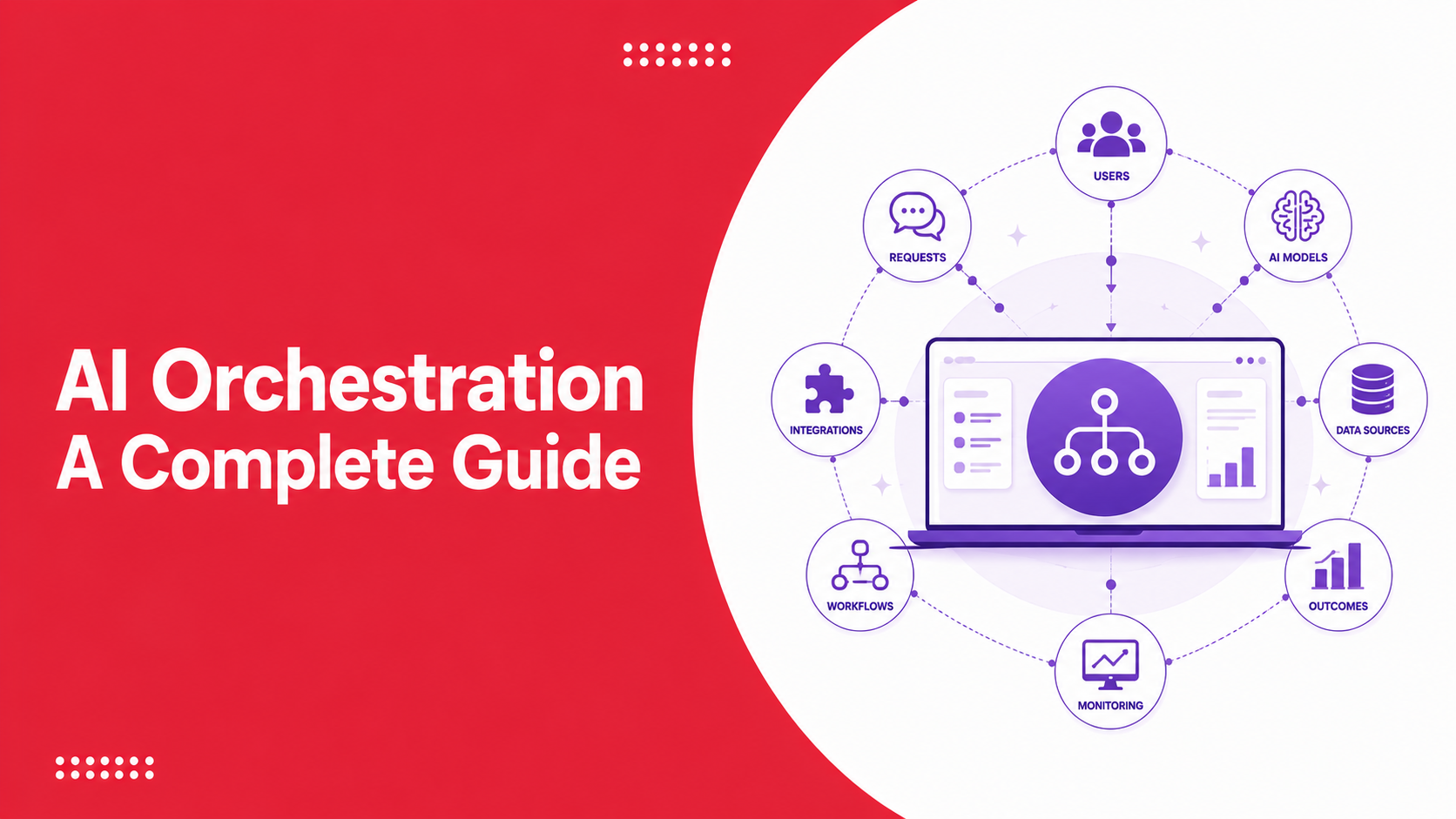
AI orchestration keeps those handoffs from becoming extra manual work. It passes the case between agents and business systems, follows company rules, sets the order of work, and sends decisions to an employee when approval or judgment is required.
What Is AI Orchestration?
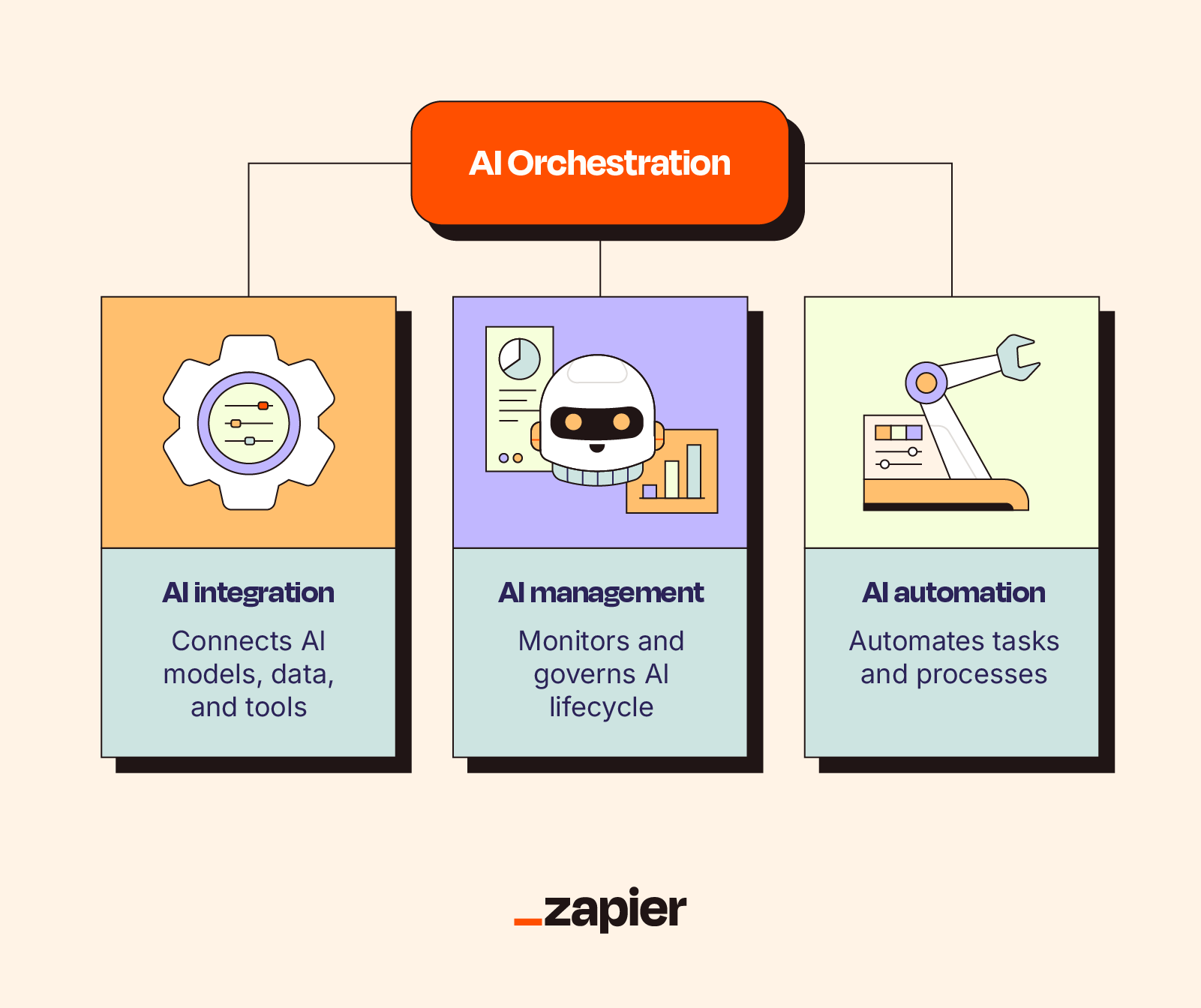
One request may pass through several parts of a company’s tech stack. A model reads it, an agent checks the details, another system carries out the action, and an employee may step in before anything sensitive is approved. AI orchestration links those stages, keeps the case in order, and brings in the information needed at each point.
Take the duplicate-payment example. A billing agent may locate the transaction. A policy agent checks if the customer qualifies for a refund. Another agent prepares the request, and the payment system releases the money after approval. The customer service platform then records the result and sends the customer an update.
Additionally, AI orchestration turns separate AI capabilities into a managed business process. Each part can go to the agent, tool, rule, or employee best placed to complete it.
Why Businesses Need AI Orchestration
Early business AI projects often created another set of disconnected tools. Each system handled part of the work, but employees still had to transfer information, create tickets, and follow up on approvals.
AI automation orchestration connects these separate tools and processes so that work can continue without losing information.
1. It Reduces Automation Silos
Customer and workflow data can stay with a request from the first message through to the final action. Agents and business systems can refer to the same case history instead of working from separate records.
2. It Improves Operational Efficiency
Billing may own one part of a case, logistics another, and field service the next. AI orchestration passes the work along with the case details, so staff do not have to keep forwarding it themselves.
3. It Creates More Consistent Customer Experiences
When a case moves between channels or departments, the conversation, account details, and earlier actions stay with it. The same policies, approval checks, service rules, and escalation paths can then be used throughout the process.
4. It Supports AI at Enterprise Scale
Once the core setup is in place, new agents and workflows can plug into it. They can use the same system links, access rules, checks, and upkeep already used elsewhere.
Key Components of AI Orchestration
Seven pieces usually sit behind an orchestrated AI setup.
- Inputs and Triggers: Every workflow needs a starting signal, from a new customer query to a background system update
- Context and State: The platform keeps a live case record so later steps can see earlier decisions and unfinished work
- Orchestration Logic: This is where the platform decides who handles the next task and what to do if the process gets stuck
- AI Agents and Models: The intelligence used to read, assess, create, or recommend during individual stages of the work
- Tools and Enterprise Integrations: The links that let the process read from or write to the company’s existing software
- Guardrails and Human Control: The limits that decide what can happen automatically and what must be checked by an employee
- Observability and Feedback: A record of how the process ran, where it struggled, and what teams may need to adjust
How AI Orchestration Works
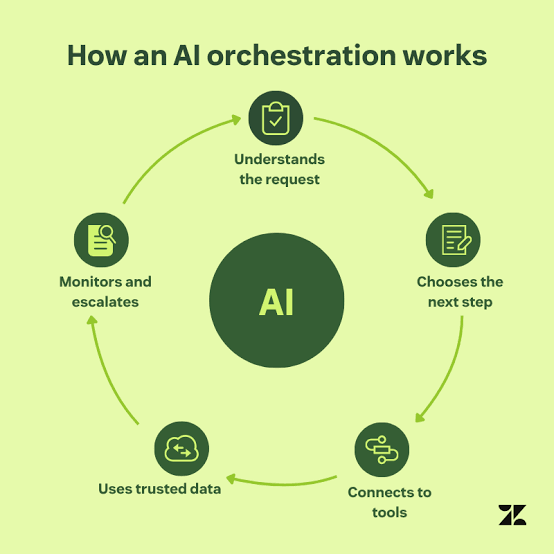
AI orchestration starts when a customer request, internal task, or system event opens a workflow.
1. The Platform Collects Context
The platform first identifies the request and retrieves the information needed to handle it. Depending on the process, this may include:
- Customer identity and account history
- Previous conversations or service cases
- Order, payment, or claim details
- Current company policies
- The status of related requests
2. The Orchestrator Selects a Workflow
The orchestration engine chooses the process to run and decides how to divide the work. Clear, repeatable decisions may follow business rules. Tasks that involve interpretation or judgment may go to an AI agent.
3. Agents and Systems Complete the Work
AI agent orchestration coordinates how agents use tools, follow workflow rules, exchange context, and pass work to other agents or systems.
Multi-agent orchestration brings several specialist agents into the same workflow. They may work one after another or complete separate checks at the same time. A supervising agent or routing layer can compare their outputs, handle disagreements, and move the task when another specialist is needed.
4. Controls Remain Active Throughout the Process
The AI orchestration platform tracks the workflow from start to finish. It can:
- Preserve context and workflow state
- Apply security and permission rules
- Record agent and system actions
- Retry failed steps
- Pause the workflow for human approval
- Escalate exceptions to the right employee
These controls can pause or stop the workflow when information is missing, a connected system is unavailable, or the requested action falls outside an agent’s authority.
5. The Outcome Is Recorded and Shared
When the job is done, the result is saved in the systems that were used, and the person waiting for it gets an update. The platform also keeps the practical details from that run, including the time taken, failed steps, approvals, and feedback.
Looking back at past runs can reveal where cases keep getting stuck or sent to the wrong place, giving the team a clear idea of what to fix.
AI Orchestration vs AI Agents
An AI agent usually owns one part of the process. It might answer a product question, check an order, review a document, or make an allowed update using the tools and data connected to it.
AI orchestration works across the wider process. It coordinates agents and other resources, controls their sequence, carries context between them, and applies business rules.
| Comparison Area | AI Agent | AI Orchestration |
| Purpose | Complete a defined task or work toward a limited goal | Coordinate an end-to-end business outcome |
| Primary Function | Interpret, reason, generate, or act | Route, sequence, synchronize, monitor, and govern |
| Scope | One role, task, or domain | Multiple agents, systems, teams, and decisions |
| Decision-Making | Makes task-level choices within assigned permissions | Controls workflow order, handoffs, and escalation |
| Integration With Systems | Uses selected tools or APIs | Coordinates work across the wider technology stack |
| Business Use Case | Check an order status or summarize a case | Resolve an order issue across support, logistics, and payments |
| Example | A refund eligibility agent | A refund workflow covering verification, approval, payment, and communication |
Real-World AI Orchestration Use Cases
The strongest AI orchestration use cases usually involve work that crosses several systems, policies, and departments.
1. Customer Support Automation
A customer reaches out because an order is late and they want to cancel it. The system checks who they are, looks up the shipment, reviews the cancellation rules, and pulls the latest delivery status before showing the available options.
2. Claims Processing in Insurance
An insurance claim can pass through several stages, from the first submission and document checks to policy review, damage assessment, fraud screening, customer communication, and adjuster approval.
3. Loan Processing in Banking
Banks can use enterprise AI orchestration for document collection, identity checks, application validation, data entry, eligibility checks, and status updates.
4. Employee Service Desk Automation
An employee issue can touch several internal teams. One workflow can work out where it belongs, pull the right policy, check permissions, raise the request, gather approval, and start the next action.
Kapture AgentOS is an agentic operating system that’s built as an enterprise operating layer for this type of execution.
- Vitos supports the creation, orchestration, testing, and deployment of agents across channels and workflows
- Command provides human oversight, approval controls, and intervention
- Calibrate evaluates agent and human interactions against set standards
- Pulse connects operational data with recommendations and actions
With this setup, enterprises do not have to treat every new agent as a separate project. Agents can use the same case records, permissions, and operating rules.
How to Implement AI Orchestration in Your Business
Choose the business process before choosing the agents. Look for work that causes regular delays and has an outcome you can track. Gartner’s June 2025 forecast warned against deploying agentic AI without that groundwork.
It expects over 40% of these projects to be dropped by the end of 2027, with high costs, weak business cases, and poor risk controls among the main reasons.
1. Start With One Measurable Workflow
Choose a process with a clear outcome and enough volume to produce useful data. Customer refunds, claim intake, order exceptions, password access, and document verification are practical places to begin.
2. Separate Rules From Judgment
Use business logic for steps that have a fixed answer. AI agents are more useful when the work involves understanding language, comparing unstructured information, or choosing from several valid paths.
3. Evaluate the Platform Against the Workflow
A platform should fit the process already in use, not force the business to redesign everything around a feature list.
It needs to pass case details between steps, connect with core software, restrict access, wait for sign-off where needed, and recover after a failed or paused run.
4. Set Boundaries Before Deployment
Decide which data each agent can access, which actions it can complete, when approval is required, and when an employee must take over.
Test the workflow with historical cases, exceptions, policy changes, incomplete data, and system outages before using it with live requests.
5. Measure Completed Outcomes
Track resolution rates, completion time, rework, escalations, policy compliance, customer effort, and the cost of each completed workflow.
Add more processes after the first one is stable and its results can be measured consistently.
The Future of AI Orchestration
The number of agents inside business software is expected to rise quickly. According to Gartner, the use of task-specific agents in enterprise applications could rise from under 5% in 2025 to 40% by the end of 2026.
Broader Multi-Agent Systems
Agents will increasingly work outside the limits of one application. A customer issue could move from support to delivery and then to finance. The orchestration layer can keep the same case moving, compare conflicting outputs, and route the issue for review when needed.
More Durable and Adaptive Workflows
Also, future workflows may continue for several hours or days without losing their state. A process could pause while waiting for a document, customer reply, or manager approval and then continue from the same point.
Greater Autonomy With Clear Boundaries
More capable agents will be able to complete a larger share of operational work. Enterprises will still need to define:
- Which systems and data an agent can access
- Which actions it can complete independently
- When human approval is required
- How failures and conflicting decisions are handled
- How actions are recorded and reviewed
Bringing AI Workflows Under Control
AI orchestration keeps the different parts of a case working together. Agents, company systems, data, and employees can all work from the same information, helping the request move from an automated reply to a finished outcome without losing its history along the way.
Kapture CX brings these capabilities into one operating structure for customer and employee workflows. Businesses can create and coordinate agents, set human checkpoints, evaluate interaction quality, and use operational feedback to improve future execution.
A personalized demo can help teams see how this setup could work with their current systems, policies, and service processes.
FAQs
AI orchestration is the process of managing AI agents, business rules, data, software tools, and people within one workflow. It assigns each step, keeps the required context available, and tracks the process from start to finish.
The main benefits include fewer automation silos, faster workflow completion, consistent policy use, better context across channels, controlled access to business systems, clearer human escalation, and stronger visibility into AI performance.
Start with one high-volume workflow that has a clear outcome. Map the systems and decisions involved, define agent permissions and approval stages, connect the required data, test the process with real cases, and track the results. Add more workflows after the first deployment is stable.



 +1833-386-0222 (USA)
 enquiries@kapture.cx