














TL;DR
An escalation matrix is a structured process that defines who gets notified when a customer issue is not resolved on time. It has two types. Functional escalation moves the ticket to a more skilled agent. Hierarchical escalation moves it up the management chain.
A good escalation matrix reduces resolution time, prevents issues from falling through the cracks, and keeps customers from having to follow up repeatedly. Without one, your support team is guessing who should handle what and when.
“Between an uncontrolled escalation and passivity, there’s a demanding road of responsibility that we must follow.”
–Dominique De Villepin (Former Prime Minister of France)
Keeping your customers happy while offering them the best experience possible is instrumental to making your business prosperous. A customer support escalation matrix helps teams manage ticket escalation smoothly. It clearly defines when to escalate, how to escalate, and who should handle issues at each level based on complexity.
It brings clarity to issues, reduces wait time, and ensures quick resolving of tickets. At the same time, it helps maintain strong customer relationships and reduces operational costs.
What is an Escalation Matrix ?
An escalation matrix for service support is a structured system within a ticketing platform that defines when to escalate an issue and who should handle it at each level.
In this article, we’ll cover how to use a customer support escalation matrix to improve ROI and how to optimize it for better results.
When a service ticket is filed, an escalation process takes place with a structured flowchart approach that specifies which departments and individuals should be contacted and in what order of hierarchy. It also determines when the issue should be escalated further to address the problem efficiently and then acquire the required resolution.
Depending on the scenario, a dummy matrix is created of a succession of steadily rising levels of contact. The purpose of any matrix is to have a real face-to-face conversation with the most proactive support team member who can provide help at any hour of the day, without letting the system attend it.
As soon as the escalation reaches a higher level of authority, the wait time increases, and the problem remains unsolved. It’s important to prioritize and attend to every issue raised at the same time before it shifts lower in the list.
How an Escalation Matrix Improves Customer Support
An escalation matrix gives your support team a clear path to follow and shows exactly who should handle an issue at each level, so nothing gets stuck.
Additionally, it helps resolve tickets faster by sending them to the right person at the right time, reducing wait time and improving efficiency.
With this, you get a well defined structure to your team with a clear hierarchy and organized workflow, thereby making it easier to manage and track every issue.
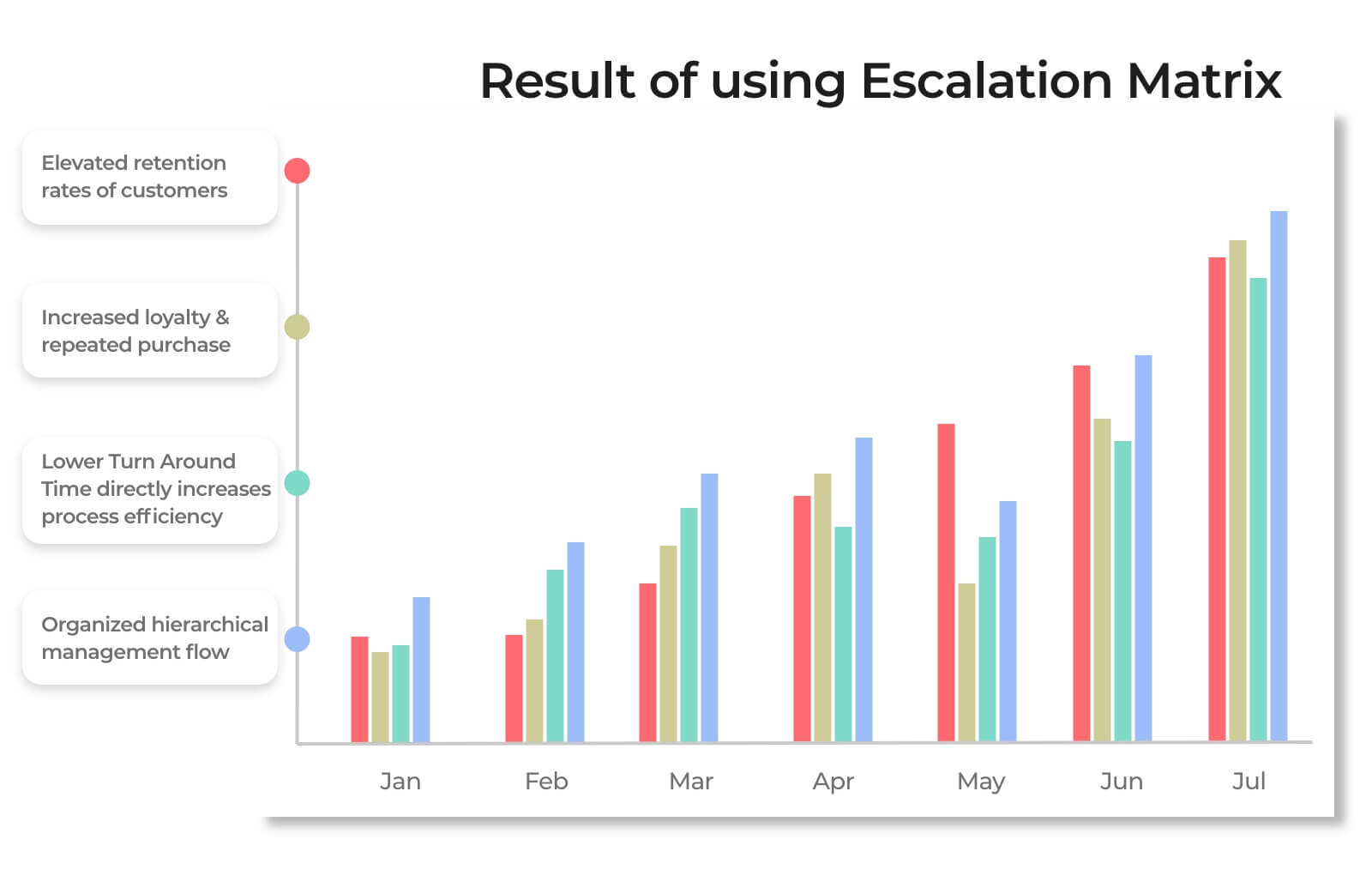
Over time, this results in:
- Improved customer retention
- Increased loyalty, repeat purchases, and CSAT
- Reduced turnaround time
- A clear and organized management flow
Now that you understand how an escalation matrix improves customer support, let’s look at the different types used in real scenarios.
Types of Escalation Matrix in Customer Support
In customer service, escalation matrices for service support are segregated based on the strategy they follow chronologically. Customer support teams use it as a blueprint to fine-tune their approach towards support ticket escalation issues. Moreover, to help you understand them better we have categorized them into 3 segments:
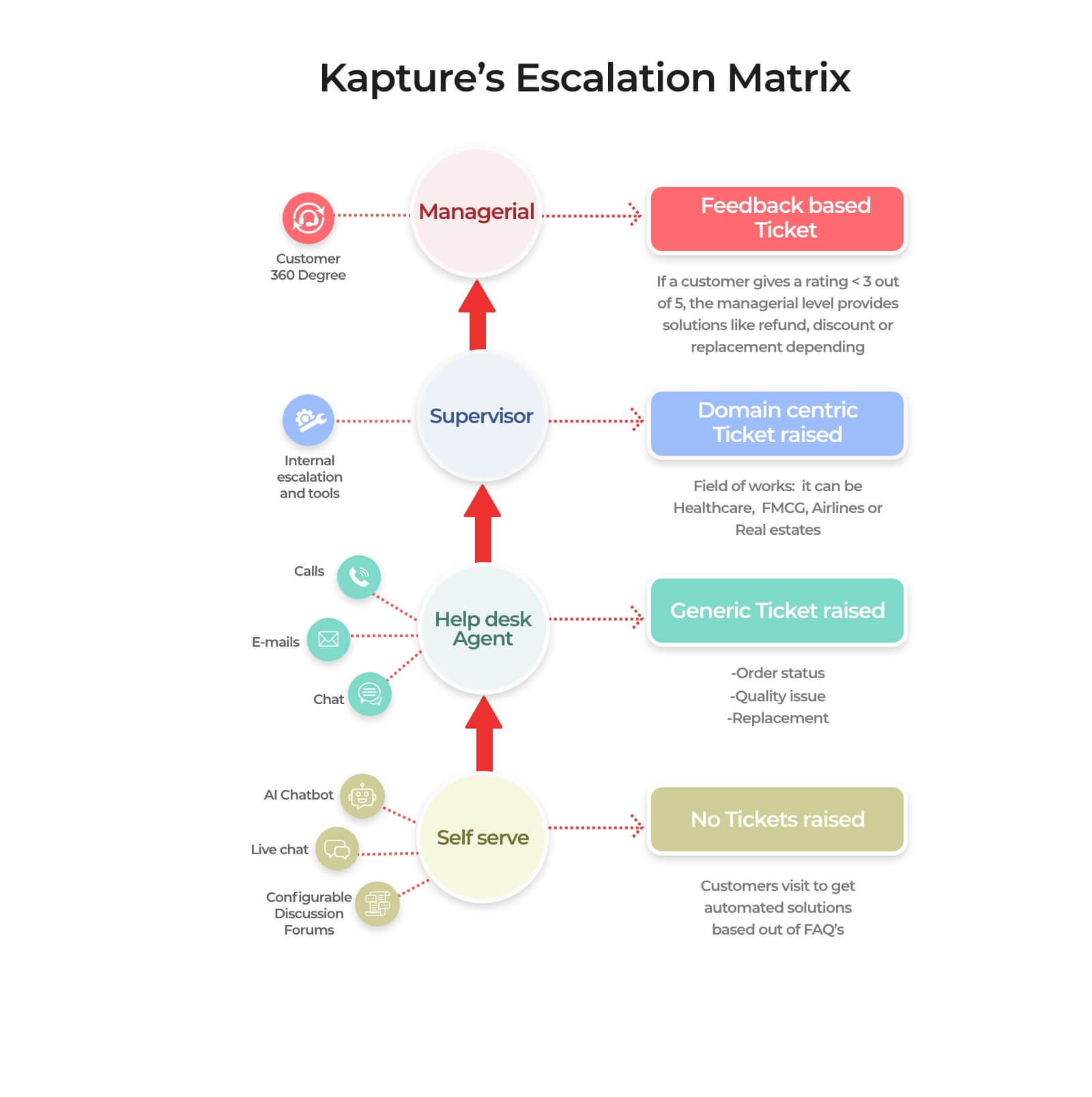
1. Hierarchical Escalation: When an occurrence of an event is forwarded to a team or person depending on their expertise or seniority inside the organization, it is referred to as hierarchical escalation.
For instance, there’s a customer on-call with a tier 1 agent who is addressing a complicated refund issue. In a hierarchical structure, if they can’t resolve the issue, the agent will escalate it to the supervisor or further on to the account manager until it is resolved.
2. Domain-Centric Escalation: A ticket will be directed to the team or individual who has the exact competence needed to resolve the significant concern, even if they aren’t the next in line hierarchically.
The pre-sales employee, for example, if A is senior to B, B would still be the best individual to deal with the situation at hand.
In a software development company, a bug is reported by a client that’s affecting the payment processing functionalities of the platform. The customer support team instead of escalating it to a senior support engineer, they instead assigns it to the payments module expert, even though they are hierarchically at a junior level because they have the exact technical expertise needed to resolve this exact problem.
3. Priority Escalation: An escalation based out of priority triggers keywords that identify inquiries that are urgent and critical (measured by a metric of low, medium, and high ratings). It can be a comment, an email, or feedback by a client/customer that is connected to the relevant support team to be addressed faster in order of priority and importance.
At Kapture, this is an efficient ‘Conflict Management and Resolution Technique’ that is used to detect and competently resolve high-priority issues.
For example, a customer raises a ticket with the subject ‘Delayed Product Delivery’ as a keyword. As soon as the system recognizes the word ‘Delayed’, a trigger assigns it to ‘High’ priority and escalates it to the concerned customer support team that can resolve the issue.
How to reduce your Escalation Rate?
There are customer support teams that are able to achieve First Call Resolution (FCR) more quickly than those that have a higher escalation rate. The factors that can affect the latter can range from anything to peak hours, high call volumes, industry type, or direct requests for an escalation. However, it is in the company’s best interest to maintain a low escalation rate regardless of the factors mentioned above.
How can this be achieved?
- Understand when it is the most opportune time to increase the time limit for attending a query, depending on the problem.
- Have a thorough understanding of your Service Level Agreement (SLA) and Service Level Objective (SLO).
- Install a well-scheduled ticketing helpdesk tracking system that helps in mapping the tickets that must be attended on a particular day by an assigned agent.
- If a call requires task dependency, then arrange a solution based on suggestions made by other departments.
- Enabling automatic conversational filtered options based on repeated use cases.
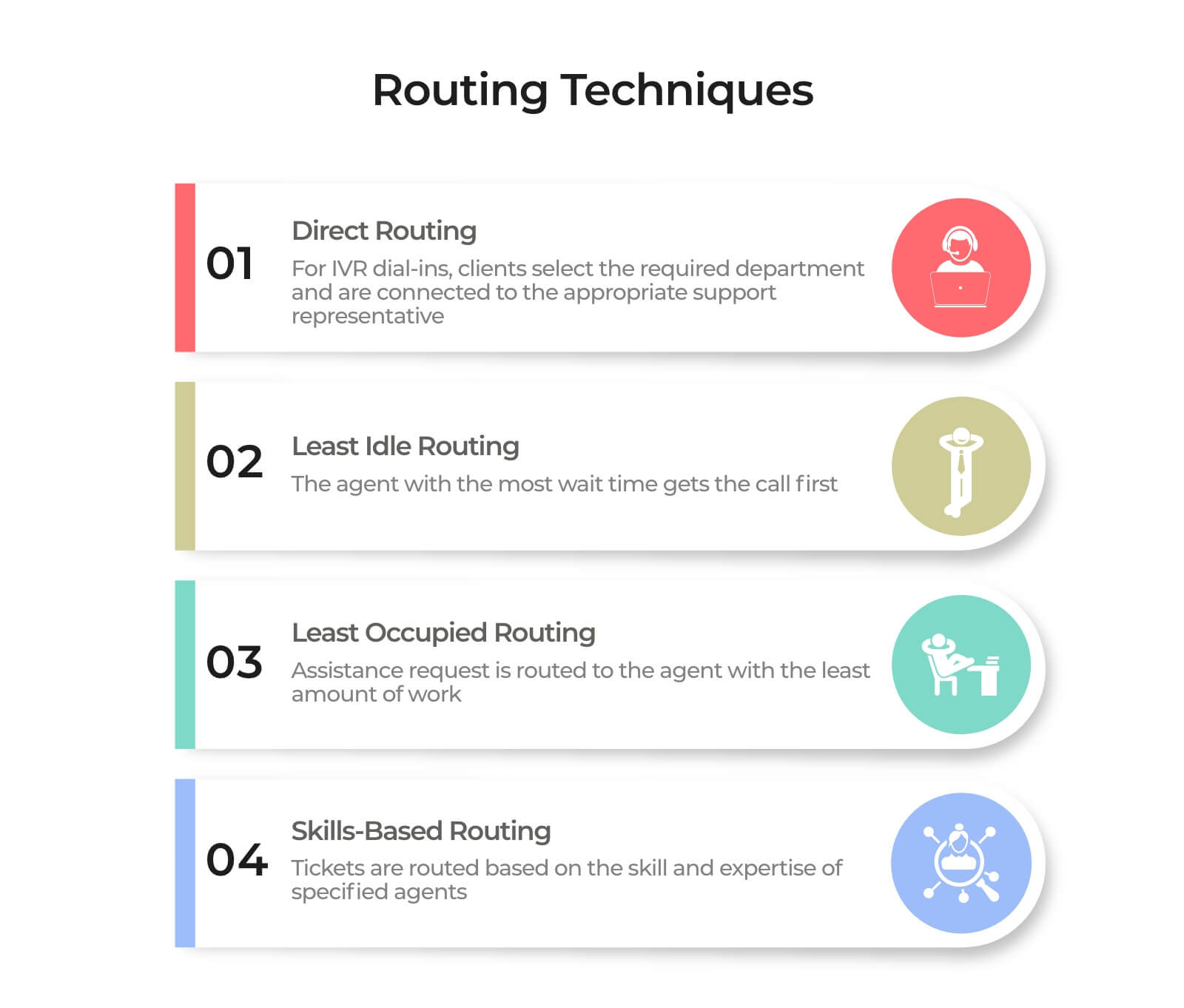
Furthermore, Kapture provides this unique feature where 3rd party vendors can be immediately contacted by tagging them in the same ticket where the problem is raised and escalation support is needed. The routing techniques are divided into four parts:
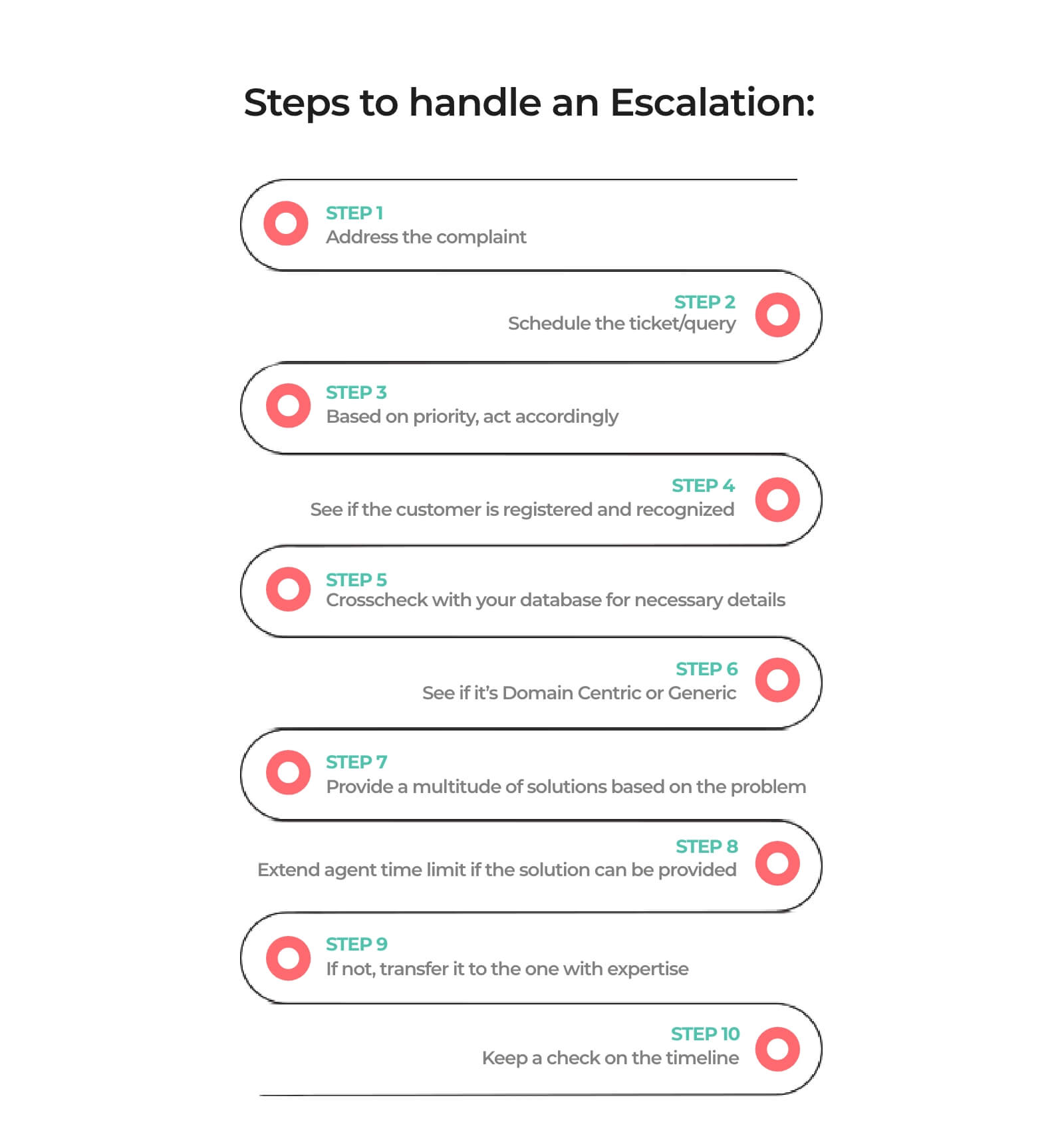
Steps to handle an Escalation:
How Customer Support Escalation Matrix helps in different industries?
The escalation matrix for service support is a versatile tool across industries, fostering customer relationships and driving sales. In sectors like technology, retail, banking, and travel, it aids in understanding client needs and improving experiences. This framework enables businesses to strategize effectively by prioritizing touchpoints.
In IT, the escalation process addresses issues promptly through proper monitoring, ensuring timely resolution. Customer service escalations, stemming from miscommunication or technical glitches, require effective management to uphold a positive customer experience.
In e-commerce, the escalation matrix enhances sales and conversions. In banking, it categorizes issues for swift resolution, while in travel, it targets key leads, utilizing tailored strategies to capture attention in the digital era.
Types of Escalation Matrix Templates for Service Support
There’s no one-size-fits-all escalation matrix for service support format. Depending on your team structure, SLAs, and customer expectations, you can pick from different templates or even combine them. Here are some practical formats you can start with.
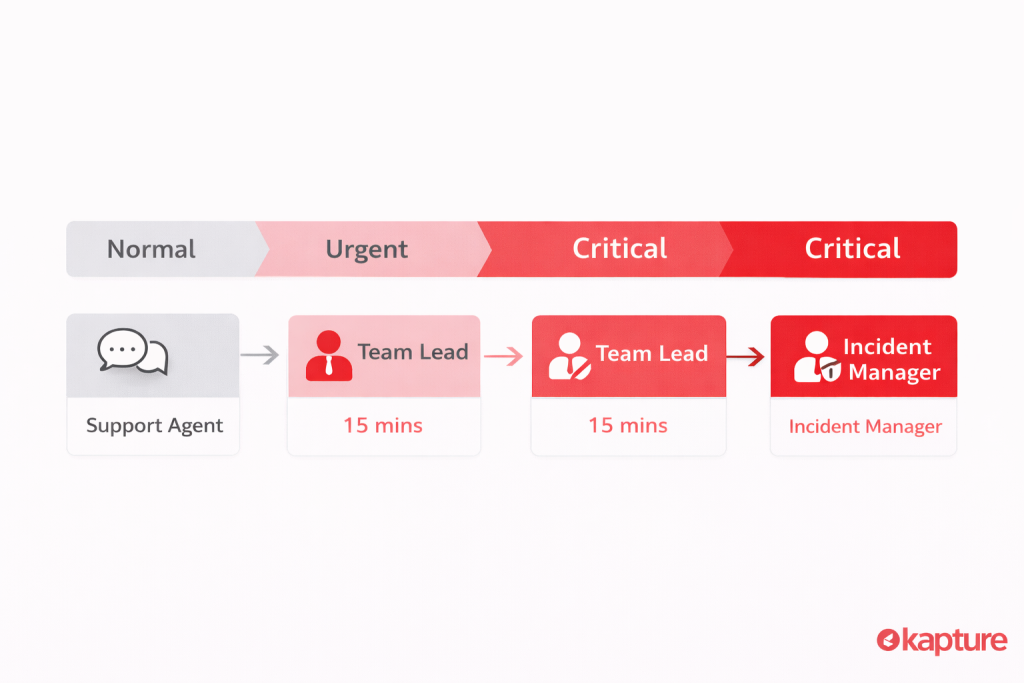
1. Simple Escalation Matrix Template
When to use this
Use when you want a clean, straightforward escalation pathway that’s easy for frontline agents and new teams to follow. Great for documenting basic escalation rules for typical support issues.
Key features
- Easy to follow escalation stages
- Includes severity levels (e.g., Critical → Normal)
- Good for help desks and basic support workflows
- Works as an onboarding reference for new support agents
Example layout
| Issue Type | Severity | First Response | Escalate After (Time) | Next Owner |
|---|---|---|---|---|
| General query | Normal | Support Agent | 30 mins | Team Lead |
| Feature bug | Urgent | Support Agent | 15 mins | Senior Engineer |
| Outage | Critical | Support Agent | 5 mins | Incident Manager |
2) Basic Problem Escalation Matrix Template
When to use this
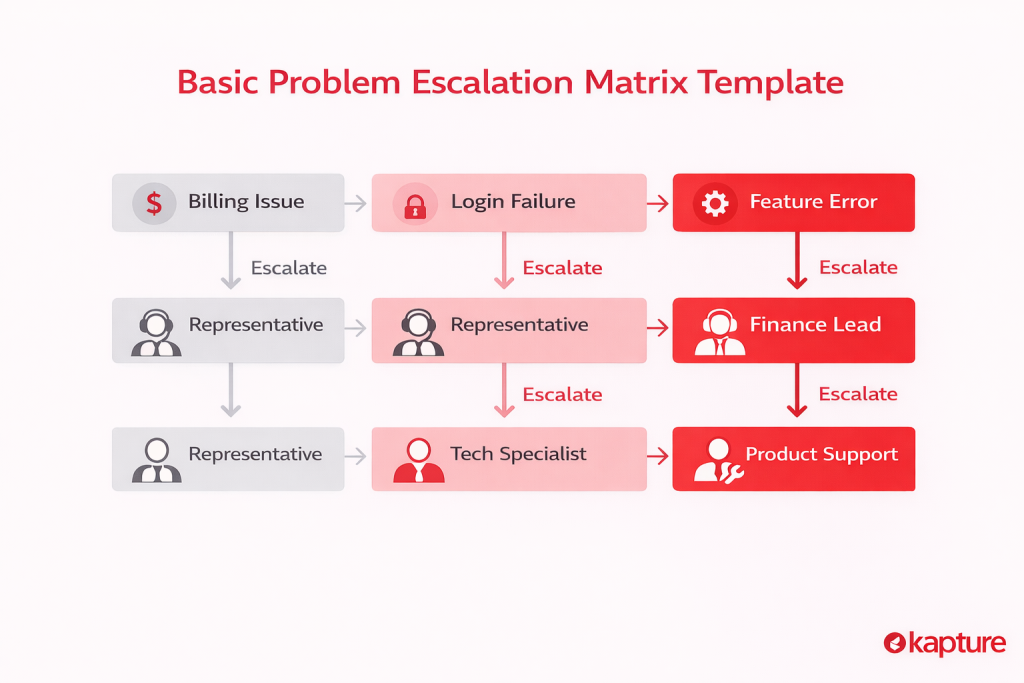
Use when you need to break down problem types and escalate systematically — useful for structured triage when support categories are diverse (e.g., billing vs technical vs account).
Key features
- Multi-layer escalation fields
- Roles, response times, and escalation steps
- Helps define right person at right time
- Great for internal support handoffs
Example layout
| Problem Category | Role | Response Time | Action | Escalate To |
|---|---|---|---|---|
| Billing issue | Rep | 15 mins | Verify | Finance Lead |
| Login failure | Rep | 10 mins | Triage | Tech Specialist |
| Feature error | Rep | 10 mins | Attempt fix | Product Support |
3) Incident Management Escalation Matrix Template
When to use this
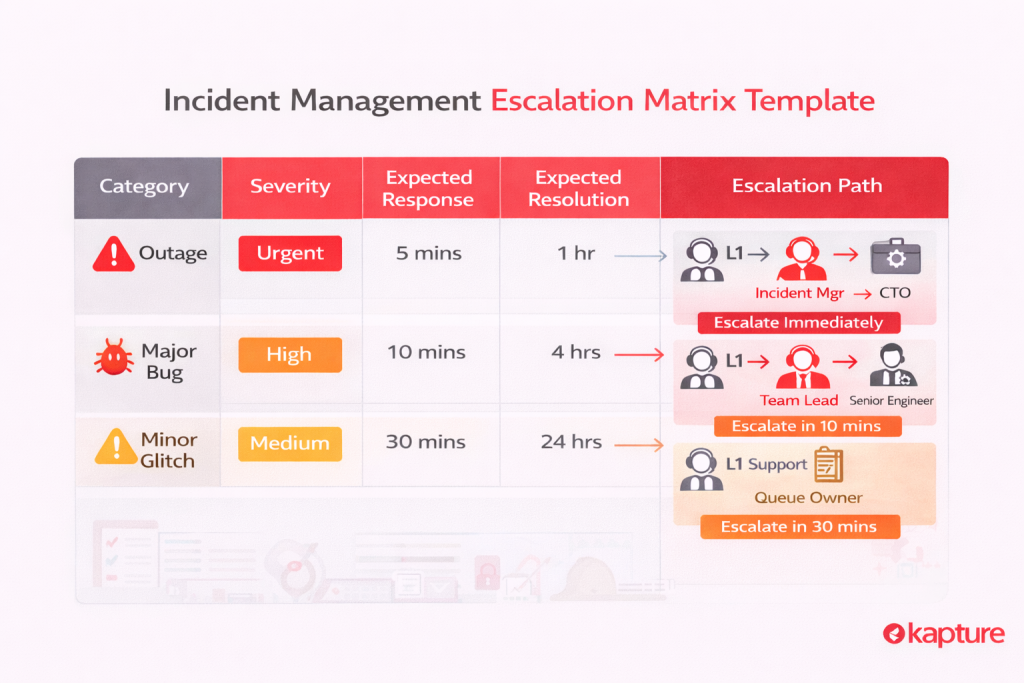
Best for severity-based incident response, where both the type and urgency of the issue change how fast and how high it escalates — perfect for high-impact CX issues like outages or major bugs.
Key features
- Categorizes by incident severity
- Includes expected response and resolution time
- Prioritizes high-impact incidents
- Helps align support with operational priorities
Example layout
| Category | Severity | Expected Response | Expected Resolution | Escalation Path |
|---|---|---|---|---|
| Outage | Urgent | 5 mins | 1 hr | L1 → Incident Mgr → CTO |
| Major bug | High | 10 mins | 4 hrs | L1 → Team Lead → Senior Engineer |
| Minor glitch | Medium | 30 mins | 24 hrs | L1 Support → Queue Owner |
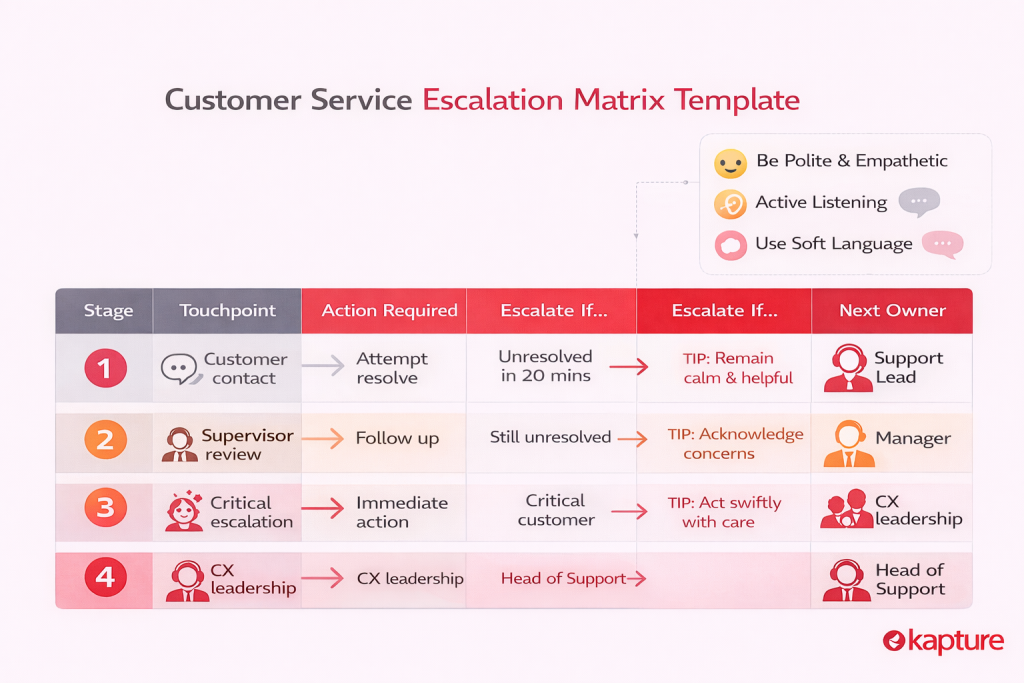
4) Customer Service Escalation Matrix Template
When to use this
Best for CX support teams handling real customer inquiries — including polite customer handling tips and escalation workflow rules alongside the matrix.
Key features
- Tailored for customer service escalation flows
- Includes interaction reminders (tone, empathy)
- Workflow for handling calls, complaints, and escalations
- Ensures structured and courteous escalation handling
Example layout
| Stage | Touchpoint | Action Required | Escalate If… | Next Owner |
|---|---|---|---|---|
| Initial service | Customer contact | Attempt resolve | Unresolved in 20 mins | Support Lead |
| Complaint escalation | Supervisor review | Follow up | Still unresolved | Manager |
| Critical escalation | CX leadership | Immediate action | Critical customer | Head of Support |
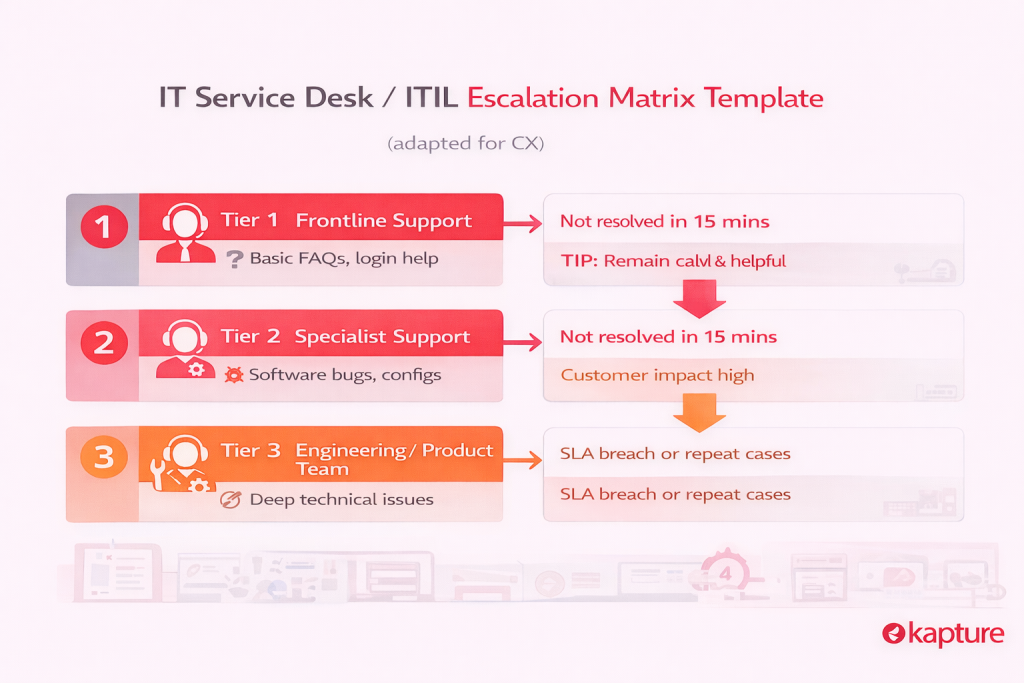
5) IT Service Desk / ITIL Escalation Matrix Template (adapted for CX)
When to use this
Use when your support org has complex, multi-tiered workflows or integrates with IT systems. It’s ideal for digital products and SaaS support teams.
Key features
- Tiered support levels like ITIL (Tier 1, 2, 3)
- Customizable escalation paths
- Often diagram-driven for clarity
- Works well for resolving technical customer issues
Example layout (CX adapted)
| Tier | Role | Typical Issues | Escalation Trigger |
|---|---|---|---|
| Tier 1 | Frontline Support | Basic FAQs, login help | Not resolved in 15 mins |
| Tier 2 | Specialist Support | Software bugs, configs | Customer impact high |
| Tier 3 | Engineering / Product Team | Deep technical issues | SLA breach or repeat cases |
Escalation Matrix: A much-needed solution
It is the obligation of management to continuously evaluate any occurrences of ticket escalation using the right escalation matrix format for service support whether it is an agitated caller, an agent who needs further training, or any other issue. All instances must be examined in order to determine the grounds for the escalation management team to proceed further.
To limit the frequency of escalated tickets, agents, executives or supervisors should also actively follow up on any previous occurrences to find methods to improve future scenarios of a similar nature.
A well-designed escalation matrix for service support can help develop techniques to install the perfect Help desk software. It also helps to avoid misunderstandings between employee roles and project goals as well as illustrates how your features create clarity within the internal team for better workflow and productivity.
At Kapture, we have developed an intelligent and contextual ‘Ticket Management System’ which is constantly evolving to provide improved accountability, delightful customer service, and increased overall customer satisfaction.
Know more about how Kapture handles escalations and delivers results at: – Ticket Management Software
Book your demo today and mark your brand’s identity in this competitive market with efficient CX software.
FAQ
Client escalation happens when a client is dissatisfied with the level of service which has been provided by the company and as a result decide the support agent has no other choice but to transfer the issue to his higher-ups
An escalation matrix gives structure to customer support teams on how to ideally handle c customer complaints. It outlines the personnel responsible for handling issues based on the nature and severity of it.
A well-designed escalation matrix includes:
• Issue classification: Defines problem severity levels.
• Escalation levels: Identifies who handles issues at each stage.
• Response timeframes: Set deadlines for resolution at each level.
• Communication protocol: Specifies how escalations are logged, tracked, and updated.
An escalation matrix makes certain that customer issues are handled by the people with the best expertise pertaining to the issue faced which in turn would lead to it getting sorted out quickly and the customer being all the more happy for the outcome
Customer support escalations can be categorized into:
• Hierarchical Escalation: The issue moves up to higher management or senior team members.
• Domain-Centric Escalation: The case is assigned to someone with the right expertise, regardless of rank.
• Priority Escalation: Urgent matters are flagged and fast-tracked based on severity.
To keep escalation rates low, businesses can:
• Train support agents to handle issues on the first attempt.
• Set up clear Service Level Agreements (SLAs).
• Use automated helpdesk tools to track and manage tickets.
• Implement smart routing so tickets reach the right person immediately.
Different industries benefit from escalation matrices in unique ways:
• IT & Software: Ensures system issues and bugs are resolved quickly.
• E-commerce: Helps manage complaints about late deliveries, refunds, or product concerns.
• Banking: Speeds up resolutions for transaction disputes and security issues.
• Travel & Hospitality: Prioritizes urgent booking or refund issues to improve customer experience.
,
,
,
,
,
,
,
,
,
,
,
,
,



 +1833-386-0222 (USA)
 enquiries@kapture.cx



2 thoughts on “Escalation Matrix: Types, Benefits & Customer Support Guide”
Comments are closed.