

Table of Contents

See how Kapture can work for you
Join the 1000+ Enterprises who transformed their CX while reducing support costs.
Request DemoModern AI assistants only “see” what’s in their context window – like a fixed-size short‑term memory. This window includes everything the model receives before answering: system instructions, the user’s request, recent conversation history, retrieved documents or knowledge, tool outputs, and any output format guidelines. In customer experience (CX) scenarios, context might be past support tickets, account status, FAQs, product policies, user preferences, or even a customer’s tone of voice. Kapture’s AI-driven CX platform uses context engineering to ensure the model sees the right slice of data (customer history, knowledge-base articles, etc.) so it can give precise, on‑brand answers.
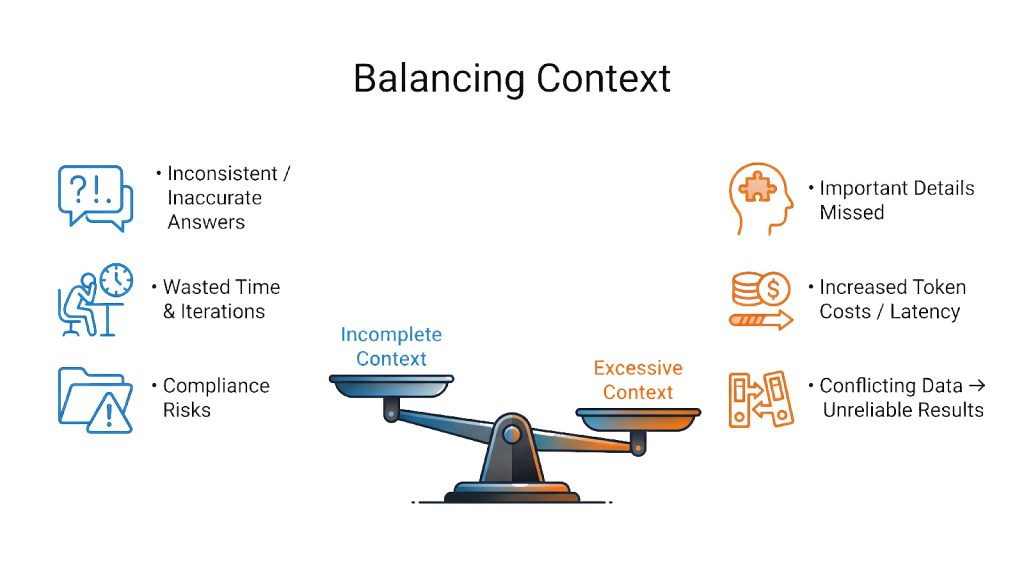
Context is finite and valuable. For example, an LLM with a 100,000‑token window can attend to on the order of 10 billion token pairs; if you double the context, the compute cost roughly quadruples. This means every extra token consumes budget and attention. Too much irrelevant context can “rot” performance – it confuses the model and wastes its focus. Conversely, too little context (missing user history or outdated data) makes the model guess or hallucinate. For instance, if a support bot loses track of a customer’s purchase history or cites an old policy, it can confidently give wrong answers. In CX, even one hallucination (e.g. falsely voiding a warranty) can destroy trust and incur compliance risk. Effective context engineering prevents these problems by carefully curating what the model sees at each step.
What Is Context Engineering?
Rather than treating the LLM as a black box, context engineering is the discipline of assembling and delivering the right information at the right time. In practice, this means building systems (not just crafting a single prompt) that feed the model exactly the task-relevant data it needs. Leading AI practitioners now emphasize that context engineering has surpassed prompt‑writing as the critical skill for reliable AI agents. In Kapture’s terms, it’s not enough to write a good greeting prompt – we also connect our AI to customer records, ticket histories, knowledge-base search, and internal tools so the assistant always has the full picture.
An effective context engineering framework decides what to WRITE (store in memory or documents), what to READ (retrieve on demand), how to COMPRESS (summarize), and how to ISOLATE (partition) information. In short, it shifts focus from a “magic prompt” to dynamic orchestration of data. For example, as one summary puts it: context engineering is the “art and science of filling the context window with just the right information for the next step”. This can include giving the model a persona (system instructions), examples of good behavior, and access to tools, rather than forcing it to infer everything from a generic prompt.
Why Longer Contexts Get Expensive
In a standard Transformer, every token looks at every other token when processing an input sequence. With n tokens, the model performs attention over roughly n × n pairs — a quadratic growth pattern.
So, as context length expands:
1. Doubling the number of tokens → around 4× more computation
2 . Tripling the context → around 9× more compute
3. 5× bigger window → roughly 25× the processing cost
Modern systems do use various engineering tricks to soften this scaling, but the reality is: the larger the context, the steeper the compute bill.
Blocks of Context Engineering
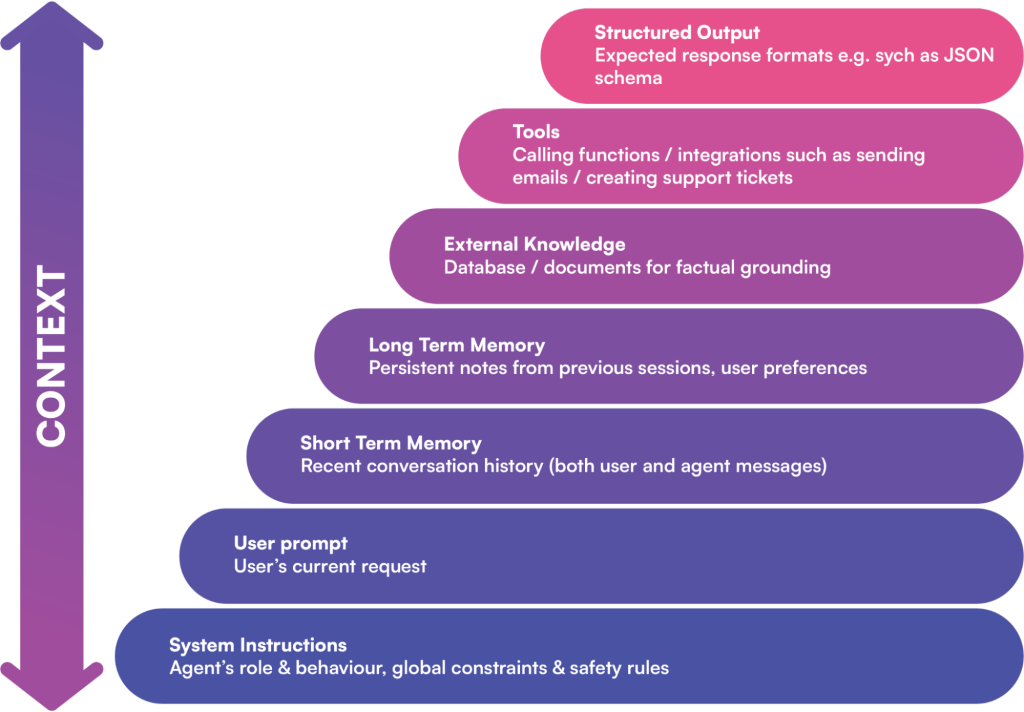
A model’s context window can include many layers of information. Key components often are:
1 . System Prompt/Instructions: Definitions of the agent’s role, goals, and rules (often with a few examples). This sets tone, branding, and compliance constraints upfront.
2 . User Query & Short-Term Memory: The current question or request and the recent chat history. This keeps the AI “aware” of the conversation flow.
3. Long-Term Memory: Persistent data like user preferences or past decisions. Kapture’s AI might recall a VIP customer’s profile or previous solutions from past support sessions.
4. External Knowledge (RAG): Context-relevant facts from databases or documents. Through retrieval augmentation, the agent can insert up-to-date policy text, product specs, or code snippets into the prompt.
5. Available Tools & Interfaces: Descriptions of functions the AI can call (e.g. “send email”, “lookup ticket”) and their results. Listing only the needed tools keeps the context lean.
6. Structured Output Guides: Schema or format templates (for example, “answer in JSON with these fields”). These instructions guide the model’s response format.
By carefully curating these pieces, Kapture ensures the AI has everything it needs. For instance, a meeting-scheduling agent wouldn’t just see “Are you free tomorrow?” – it would also get the user’s calendar, recent emails about meetings, the requester’s identity, and a “send_invite” function before generating a reply. Without that rich context, the AI might give a meaningless answer; with it, the response is accurate and actionable.
Context Engineering Techniques
Several techniques help manage context efficiently. These often work together to filter, fetch, and condense information so the model’s limited window is used optimally:
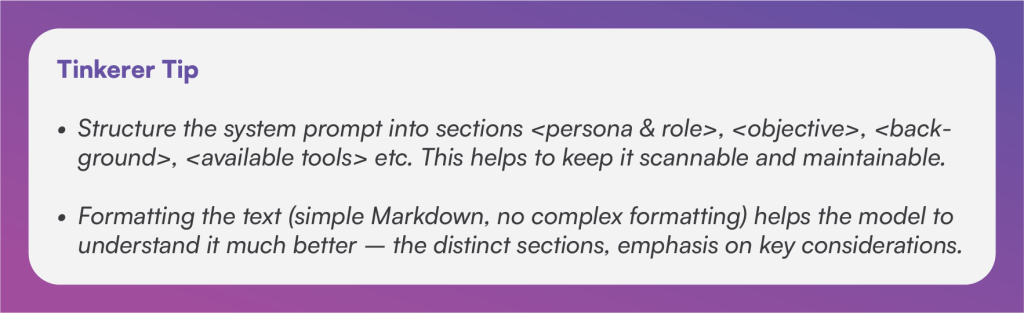
1 . Smart System Prompts: Start with a clear, structured instruction. For example, Kapture might use a system prompt with sections for role, objectives, background, and available tools. This “scannable” format helps the AI parse its role. We keep the instructions as concise as possible – too many rules make the agent brittle, too few invite errors. Include few-shot examples if needed, and consider the language style (customers expect a friendly tone, compliance content needs formal precision).
2 . Retrieval-Augmented Generation (RAG): When up-to-date facts are needed, we use vector databases or search to fetch relevant docs and inject them into context. A classic example: if a customer asks “What’s our refund policy?”, the system converts the query into a vector, matches it against the knowledge base, and returns the most relevant policy text. Those text snippets are then prepended to the prompt (e.g. under a “Retrieved Information:” header). RAG greatly improves factual accuracy and transparency – the model can cite the exact source of information. In practice, documents are split into coherent “chunks” that fit the token budget (too-large blocks would overflow the window) and scored by relevance (often via cosine similarity in the vector space, possibly refined by recency or metadata). Because this approach grounds the model in real data, we can often lower the temperature to near zero (making responses deterministic) and trust it to produce consistent answers. In CX applications, RAG means the assistant’s answers stay up-to-date with the latest product data or company news.

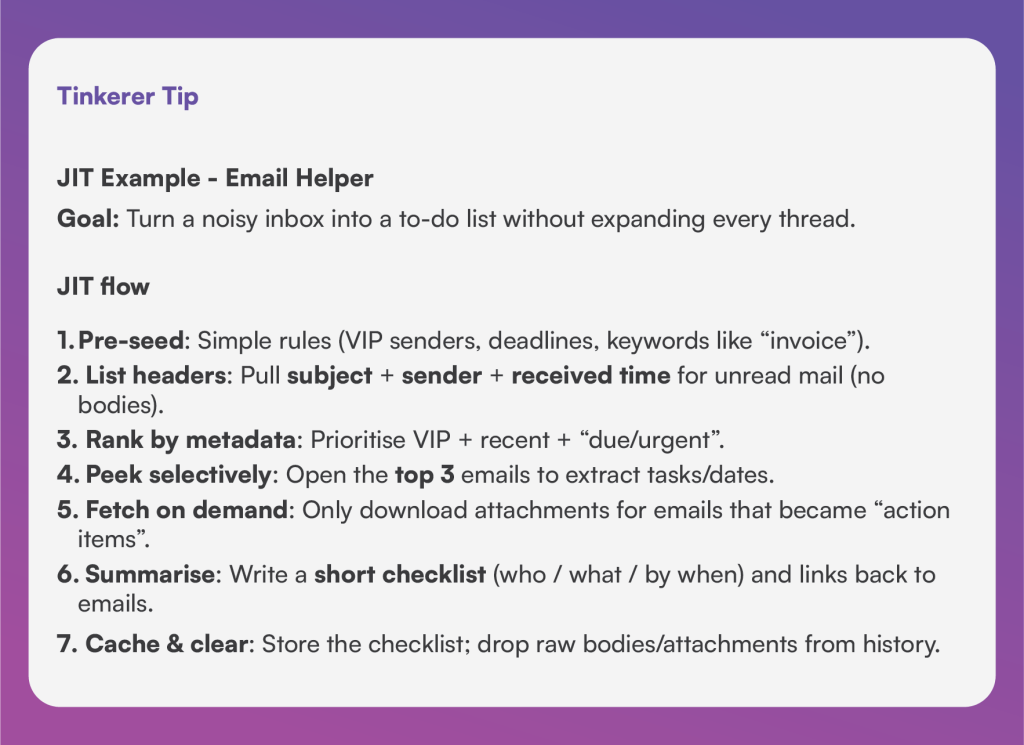
3 . Just-In-Time (JIT) Retrieval: Instead of loading all possible data at once, we keep only lightweight references and fetch details on demand. This mimics human behavior: when reading an email inbox, you might only open (and read) a message if its subject or sender looks important. For example, an email triaging agent might list just the headers (sender, subject, date) and then open only the top few relevant emails to extract tasks. This JIT strategy keeps context lean: only the most pertinent email bodies and attachments are added, and everything else stays out of the model’s active window. The principle is: anticipate what info might be needed, but load it only when necessary.
4. Context Compression and Summarization: In long conversations or with large documents, older content can be compressed. When the token limit is reached, the agent (or a sub-agent) can replace verbose history with a concise summary. For example, after lengthy back-and-forth with a customer, the system might generate a short digest of resolved issues, outstanding tasks, and key customer preferences, then discard the raw dialogue.

Similarly, after using a tool (like a database query or web search), we keep just a brief summary of the result and drop the raw output (often rich text or JSON) to save space.

This “tool-result clearing” is a low-risk move that often frees thousands of tokens without losing essential information.
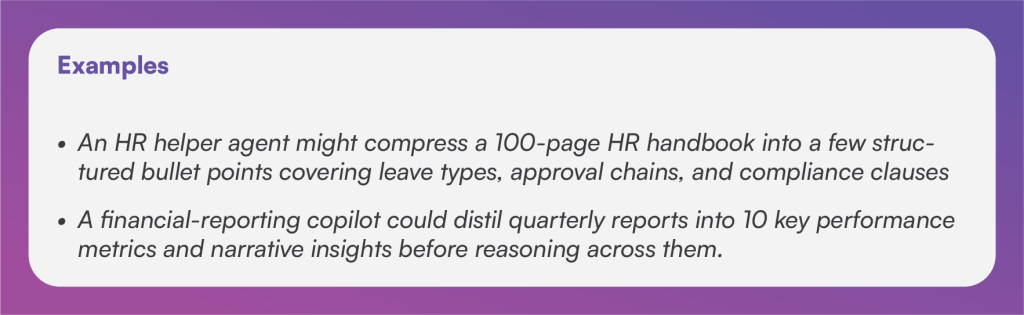
5. Semantic Compression: Going a step further, we can pre-compress large documents into meaning-dense summaries before feeding them to the model. Instead of giving the AI all 10 pages of a contract, we might distill it into bullet points of the most important parties, dates, obligations, and clauses. This “meaning-first” compression ensures the model’s reasons over the facts it truly needs, without noise. In practice, Kapture’s system might generate a quick summary of a long policy or a lengthy ticket thread so that the core points are all that take up context space.
6. Structured (Long-term) Memory: For tasks requiring continuity across sessions, agents can maintain an external memory store. Kapture’s AI might write to a persistent file or database during a conversation (e.g. logging customer preferences, unresolved issues, or decisions) and then read those notes in later sessions. This lets the AI “remember” across interactions without forcing every detail back into the chat history. For example, an AI co-pilot could keep a customer_notes.md file summarizing each conversation, and recall those summaries instead of reloading the entire past transcript. Key insights or user choices are captured as a few sentences or bullet points (often as key–value pairs like user:123.preferred_language: Spanish), which can be quickly retrieved when relevant.
7. Key–Value Memory Slots: In addition to freeform notes, it’s often useful to store specific data points in a “key-value” style memory. For instance, the system might store user:456.account_status: Gold or ticket:789.priority: High.
At runtime, Kapture’s agent can fetch just the needed keys (e.g. account_status, ticket_summary) instead of a whole document. This keeps context windows razor-focused on relevant facts. (This technique is especially handy when there’s structured CRM data behind the scenes.)
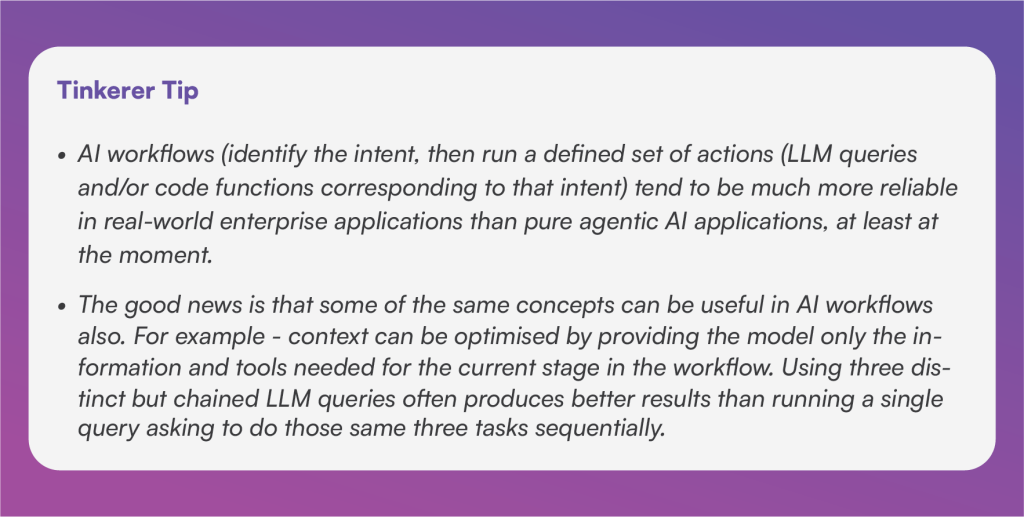
8. Multi-Agent (Hierarchical) Decomposition: Complex tasks can be split among specialized sub-agents. A supervisor agent might plan high-level steps, then delegate each to a worker agent with its own limited context. Each sub-agent can operate on a large chunk of data (tens of thousands of tokens) but only returns a concise result (a few hundred tokens) to its supervisor. For example, one sub-agent might deep-dive into a big database to extract metrics, then hand over a summary to another that formulates an explanation. This architecture keeps each context window small and relevant, avoiding “context pollution” from unrelated details. In Kapture’s workflows, this might look like separate agents for “find relevant tickets,” “summarize customer history,” and “generate response,” all coordinating under a manager agent.
9. Predictive Context Loading: Advanced systems can anticipate user needs and pre-load data. If the user starts asking about quarterly performance, the AI can automatically bring in relevant reports: “Last quarter’s P&L,” departmental budgets, historical forecasts, exchange rates, etc., before the user even asks. As one guide notes, when the system predicts the topic (“flight bookings”), it might preload hotel options, local transport info, weather, etc. By guessing what context will be needed next and preparing it in advance, the AI can respond instantly with insights (e.g. “note: demand spikes after holidays”).
Kapture’s AI could use similar tactics: for instance, if a customer mentions billing, the agent could preload recent invoices and the current pricing plan to better assist.
Common Challenges
Even with these techniques, context engineering can go wrong if not managed carefully. Key pitfalls include:
1 . Context Fatigue: Dumping too much information in the prompt can slow down the model and dilute its focus. In practice this causes longer response times and sometimes erratic answers. As research shows, as the token count grows the model must track n² token relationships, so its “attention budget” gets stretched thin. The solution is strict relevance filtering: score and trim context aggressively (e.g. by timestamp or metadata), summarize older content, and avoid redundant copies of information. In short, every piece of context must earn its keep.
2. Expired Context: If the AI is citing outdated documents (old price lists, deprecated policies, expired promotions), it will give wrong answers. A common cause is not re-indexing or refreshing the knowledge base when source data changes. To avoid this, Kapture’s system tags retrieved data with timestamps and periodically re-embeds updated content. Regular updates and checks ensure the model uses the latest facts – preventing it from confidently parroting superseded info.
3. Contradictory Context: Sometimes the context contains contradictory facts (e.g. two different support reps updated a ticket with conflicting notes, or multiple versions of a policy exist). An AI can get “confused” if it sees both at once. In CX this might happen if outdated and new knowledge co-exist. To manage this, we enforce data hygiene: conflicts are resolved or flagged before feeding context. We might use metadata (like version numbers) to prefer the latest source, or even include a brief note to the model about which source is authoritative. As one CX analysis puts it, having multiple “truths” causes hallucinations; strong governance is needed to avoid mixing unaligned contexts.
Conclusion
Context engineering is the key to making AI agents truly effective and trustworthy. Rather than just writing clever prompts, Kapture focuses on orchestrating the entire information ecosystem – combining prompts, memory, document retrieval, and tools so the model sees exactly what it needs, when it needs it. By packing high-signal information into the limited context window, Kapture’s CX AI delivers answers that are relevant, accurate, and personalized. In the end, the difference between a “good enough” chatbot and a great AI co-pilot is not the model’s size, but how well you manage its context. Master that, and customer experience automation becomes both smarter and safer.
Other blogs you’d love to read
Explore the advancements in CX and AI through Kapture.
Your Plan. Your Value. Your Growth.
Your business is different – and the pricing should reflect that.
Let’s build a plan that matches your goals, maximizes ROI, and scales with your success.
 +1(415) 319-8777 (USA)
 enquiries@kapture.cx